A quiet room
for your novel.
A place to settle into your novel. Write on a warm paper page, arrange your chapters on a board, and return to earlier versions when a sentence calls you back. Your story stays in a file you control.
$29.99 at launch, then $39.99 · One-time purchase
Made with the care
you give a sentence.
For the paragraph you read out loud. The scene you move three chapters earlier. The line you cut yesterday and want back today. Writ10 gives those small decisions room.
A considered set of tools, close to the page. Enough to hold a long story together, with space left for your own way of working.
One story.
Three ways to hold it.
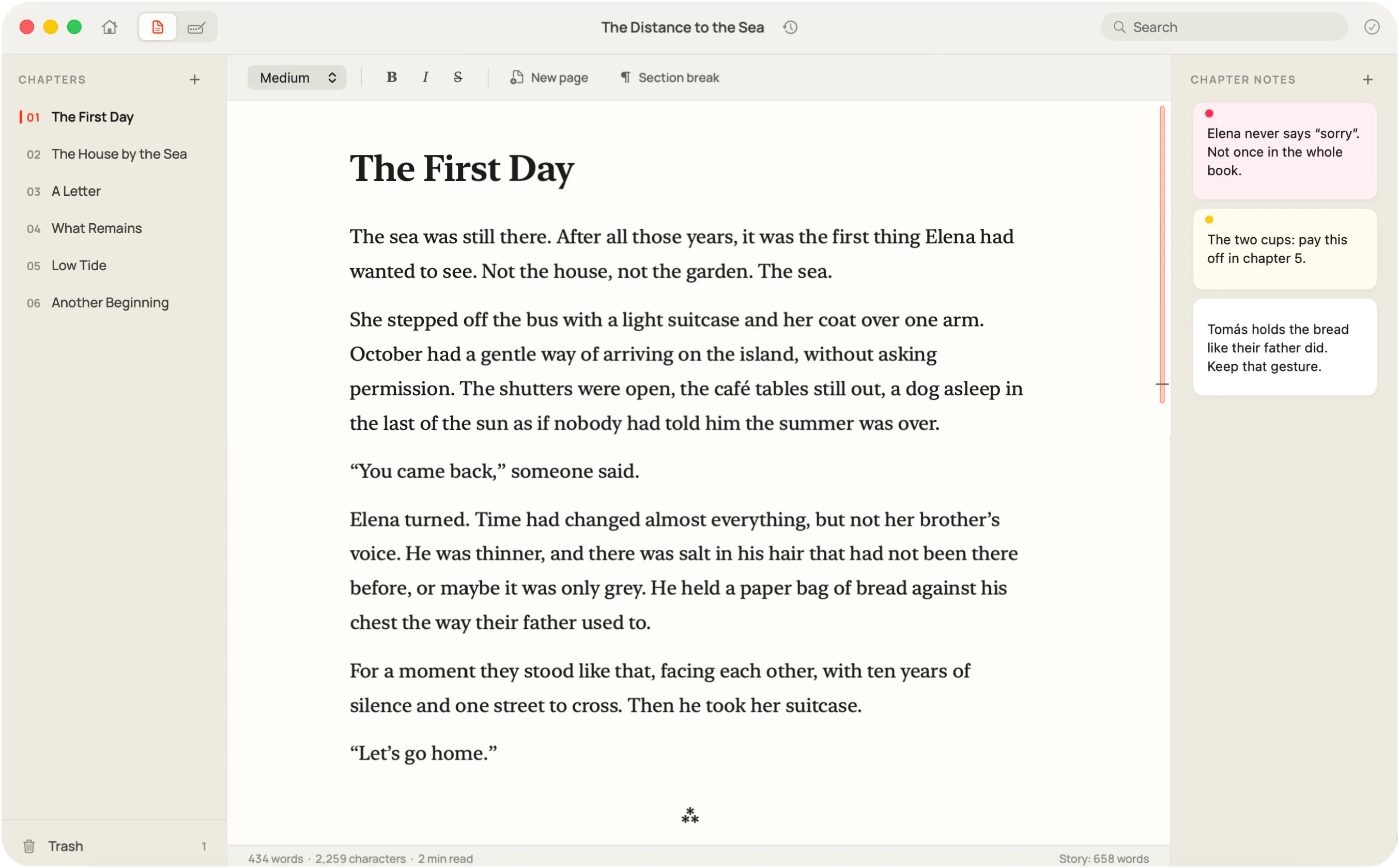
Write it, step back to see its shape, go back to an earlier draft. Your chapters connect all three views.
A page that stays out of your way.
Chapters on the left, a warm sheet in the middle, the chapter’s notes on the right. Fold any column away when you want only the page. Drag chapters into a new order, search the whole manuscript, and the app reopens exactly where you left off.
- Notes for every chapter, on quiet cards
- Page and section breaks, set like a typesetter would
- Search across every chapter at once
- Restore deleted chapters from the Trash
Step back. See the shape.
Switch to the board: the columns slide away, the page sinks, and your chapters are waiting as notes on a table. Move them around, choose their paper, draw arrows from one scene to the next, stamp them with a character or a thread. Pan and zoom like a map.
- Every chapter, a note you can pick up
- Arrows in ink, red, blue or green
- Rubber stamps for characters and themes
- New chapters wait in a tray until you place them
Find your way back.
Open the Time Machine and the page turns like a book: today’s text on the left, an older version on aged paper on the right. Pick a day from the calendar, read, copy back the sentence you miss — or bring the whole story back. Before a restore, Writ10 saves your current text as a recovery version.
- A version the first time you open your story each day
- Automatic versions before substantial text deletions
- A version whenever you press ⌘S
- Up to 60 versions, with manual saves given priority
Real screenshots · Sample story written for this page
Small things,
done properly.
Small choices that make a long writing session feel natural:
- 01
A clear red caret keeps your place on the page.
- 02
Return to the story and chapter you left open.
- 03
A book-like serif, comfortable line lengths and three text sizes.
- 04
Paste anything; keep only the words. Other people’s fonts stay outside.
- 05
Page and section breaks give each scene its space.
- 06
Your punctuation stays yours. Turn macOS text substitutions on when you want them.
- 07
Words, characters and reading time, in a status bar thin as a pencil line.
- 08
A real Mac app: native menus, the shortcuts you know, the window you expect.
Your story.
In your hands.
Each story is a single file on your Mac, wherever you choose to keep it. No account to create, no cloud of ours. Writ10 works on a plane, in a cabin, at 3 a.m. with the Wi-Fi off.
- Saved as you write
- Write without stopping to save. If a save fails, your previous file stays intact and your writing stays open.
- Quiet backups
- Local safety copies, separate from version history. Open their folder from File ▸ Show Backups.
- No surprises
- Changes from another app appear automatically when your writing is saved. If you have unsaved edits, you choose which version to keep.
- Nothing to sign up for
- Create a file and start writing. Short, optional guides help you find your way.
From draft
to book.
When you’re ready to share, choose File ▸ Compile. Make a PDF with a title page, chapter openings and page numbers; an EPUB for an ebook reader; or a Word document for the next round of editing. Markdown and plain text keep the words portable.
- Word
- EPUB
- RTF
- Markdown
- Plain text
Less software.
More voice.
Every choice in Writ10 has one job: to bring you back to the page.
WRIT10Pay once.
Keep it.
No subscription to write your own book. Buy Writ10 once and every update to your version is free.
One-time purchase. After the launch, Writ10 is $39.99.
Prices in US dollars. Outside the US, the Mac App Store shows your local price.
- The page, the board, the Time Machine and Compile
- Local files, offline, no account
- Free updates for your version
- In English, Italiano, Español, Português and Français
- macOS 13 Ventura or later · Apple silicon
Your copy never expires. A future major version, if one comes, will be an optional paid upgrade.
Launching soon on the Mac. Not on sale yet.
Good to know.
What do I get for $29.99?
The whole app: the writing page with chapters and notes, the board, the Time Machine, search, backups and Compile. It’s $29.99 at launch and $39.99 after that, paid once.
How much is it outside the US?
The Mac App Store sets the price in your country’s currency, so it follows local taxes and exchange rates and may differ a little from the US price. You’ll see it on the store before you buy.
Is it a subscription?
No. You pay once and your copy never expires. Updates to your version are free; a future major version, if one comes, will be an optional paid upgrade.
Do I need an account or an internet connection?
No. Writ10 doesn’t ask you to sign up, and everything works offline.
Where are my stories kept?
Each story is one .writ10 file, wherever you save it on your Mac — a folder, an external drive, iCloud Drive. Backups go to the app’s own folder; File ▸ Show Backups takes you there.
What if something goes wrong?
Writ10 checks every save before it replaces your file, so a failed save leaves the previous one untouched, and your writing stays open. It also keeps timestamped backups, and the Time Machine keeps versions inside the story itself.
Does Time Machine keep every change?
It keeps selected moments, not every keystroke: up to 60 versions, with manual versions given priority. Press ⌘S to keep a moment. Version history lives inside your story file; the separate safety backups are also local, so keep your own backup of your Mac.
Can I export my manuscript?
Yes: Word, PDF, EPUB, RTF, Markdown and plain text. PDF includes a book layout and page numbers; EPUB adapts to your reader; Word and RTF stay editable. Your original .writ10 file stays as it is.
Which Macs does it run on?
The current build requires Apple silicon and macOS 13 Ventura or later. Final download and compatibility details will be available at launch.
There’s a story
only you can write.
Writ10 for Mac · $29.99 at launch, then $39.99 · One-time purchase
See the launch price